

SLNet Connects RF Devices To Your Telnet Applications
A leading Telnet server, RF device connection, and terminal emulation solution.
SLNet supports multiple users on server-based applications and removes the need to reprogram applications for terminals or RF devices. It is a full-featured Telnet service for wireless RF environments, letting users log into custom applications or the Windows Common Command Shell from any RF device.
- Low-risk business solution, installed and configured in minutes
- Efficient resource use with a multi-tasking engine that allows unlimited Telnet sessions per server
- Unicode and UTF-8 support, so any language, terminal, or application can be used
and 2022 supported.
One Connectivity Layer Between Device and Application
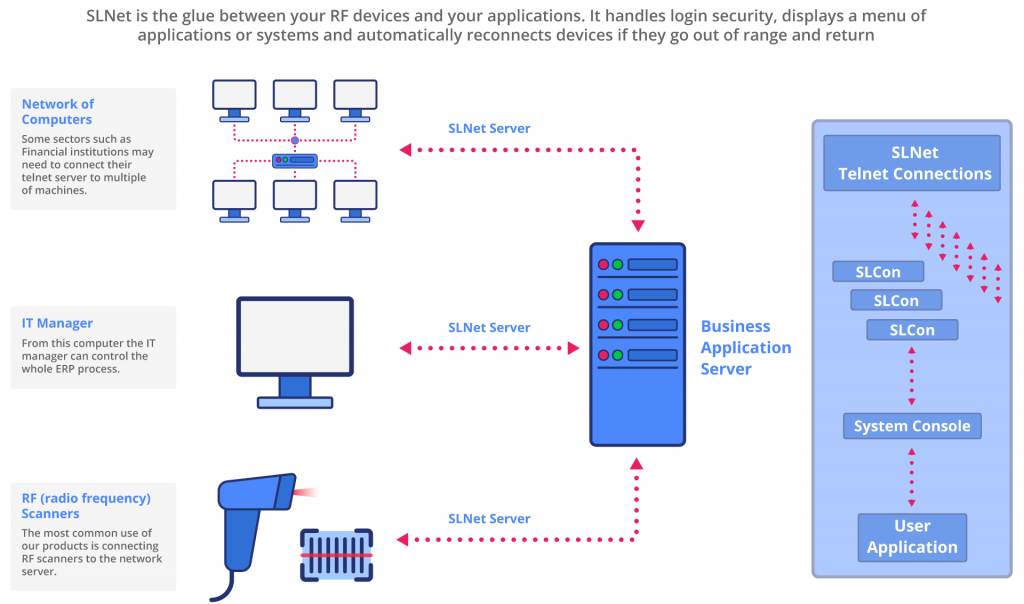
Everything IT Needs to Run RF at Scale
- High performance with low CPU use; heavily multi-threaded and asynchronous
- Unlimited concurrent Telnet sessions for any terminal-emulating device, including RF devices
- Works with any Telnet client; no proprietary client software needed
- Users can work invisibly and simultaneously without interfering with the server console user
- Two levels of timeout, including auto-reconnect
- Multi-line banner messages from the administrator
- Send messages to specific network users without interrupting work
- Customizable logon and password prompts, with encrypted credentials
- Per-user security levels
- Logon restriction by IP address or address range
- ANSI terminal sequences supporting VT-100 and VT-220
- Color support
- Multiple consoles per session, switchable by hotkey
- UTF-8 and Unicode, including multi-language single- and double-byte character sets
- Custom key sequences
- Extended logging of keystrokes, status, and events for troubleshooting
- Multi-layer configuration (domains, applications)
- Security lockdown of terminals and user access
- Management of multiple SLNet servers from one interface, locally or remotely
Nearly 20 Years Connecting RF Scanners to Windows Telnet Applications
SeattleLab would recommend that all new users use either V6.7 or, if your infrastructure is not fully 64-bit compatible, then use V6.2.1.
Users of earlier versions can easily upgrade to one of the Version 6 releases. If you have a current support agreement, you will be eligible for a discount for these licenses. Speak to our Sales team for more details.
Supported Windows Server versions
Windows 2012, 2016, 2019, 2022
Features
- Bug Fix Release
- Improvements to Auto-Reconnect features
- Performance Improvements
- Integration with SAP Console 7.3
- Improvements to SLCon user Interface
- New Installation package
to SAP
SAP recommends SLNet for customers accessing SAP Console from RF devices. SLNet supports unlimited simultaneous users on any Windows server without interference.
Users connect to applications seamlessly. With Windows 2016, 2019, or 2022, applications work in real time with any Telnet-capable RF device. Applications run on the server, so data does not have to be pulled down to the device.
Unlimited users can connect to existing applications from any terminal type without reprogramming. SLNet emulates any terminal and translates character sequences into the ones the application expects.
Download your free, fully functional 14-day trial
The trial is limited to 5 Telnet sessions and is available by choosing a version in the shop. Need more sessions for evaluation? Contact Sales.